

How to top up a mobile phone in Uzbekistan if you live abroad

To top up a phone in Uzbekistan with Profee, open the app, enter the phone number and top it up from your Profee wallet. In this article, we share details on available operators, limits, and a step-by-step guide.
All information is up to date as of September 2026. If anything changes, you'll see it in the Profee app.
Topping up a phone with Profee: what you need to know
Step-by-step guide: how to top up a phone in Uzbekistan with Profee
FAQ: topping up a phone in Uzbekistan
Topping up a phone with Profee: what you need to know
You can top up your own phone or a family member's or friend's number in Uzbekistan fee-free. Payment goes directly from your Profee wallet – you don't need to transfer money to a local card or bank account separately. This saves you time and money.
Six operators are currently available: Beeline, UCell, MobiUz, UzMobile, Perfectum, and Perfectum 5G SA. Each has its own minimum and maximum top-up amount:
| Minimum top-up from Profee | Maximum top-up | |
|---|---|---|
| Beeline | 500 UZS | 1,000,000 UZS (~72.80 EUR) |
| UCell | 500 UZS | 1,000,000 UZS (~72.80 EUR) |
| MobiUz | 500 UZS | 1,000,000 UZS (~72.80 EUR) |
| UzMobile | 500 UZS | 1,000,000 UZS (~72.80 EUR) |
| Mobile (auto-detect operator) | 500 UZS | 1,500,000 UZS (~109 EUR) |
| Perfectum | 500 UZS | 10,000,000 UZS (~728 EUR) |
| Perfectum 5G SA | 500 UZS | 10,000,000 UZS (~728 EUR) |
Step-by-step guide: how to top up a phone in Uzbekistan with Profee
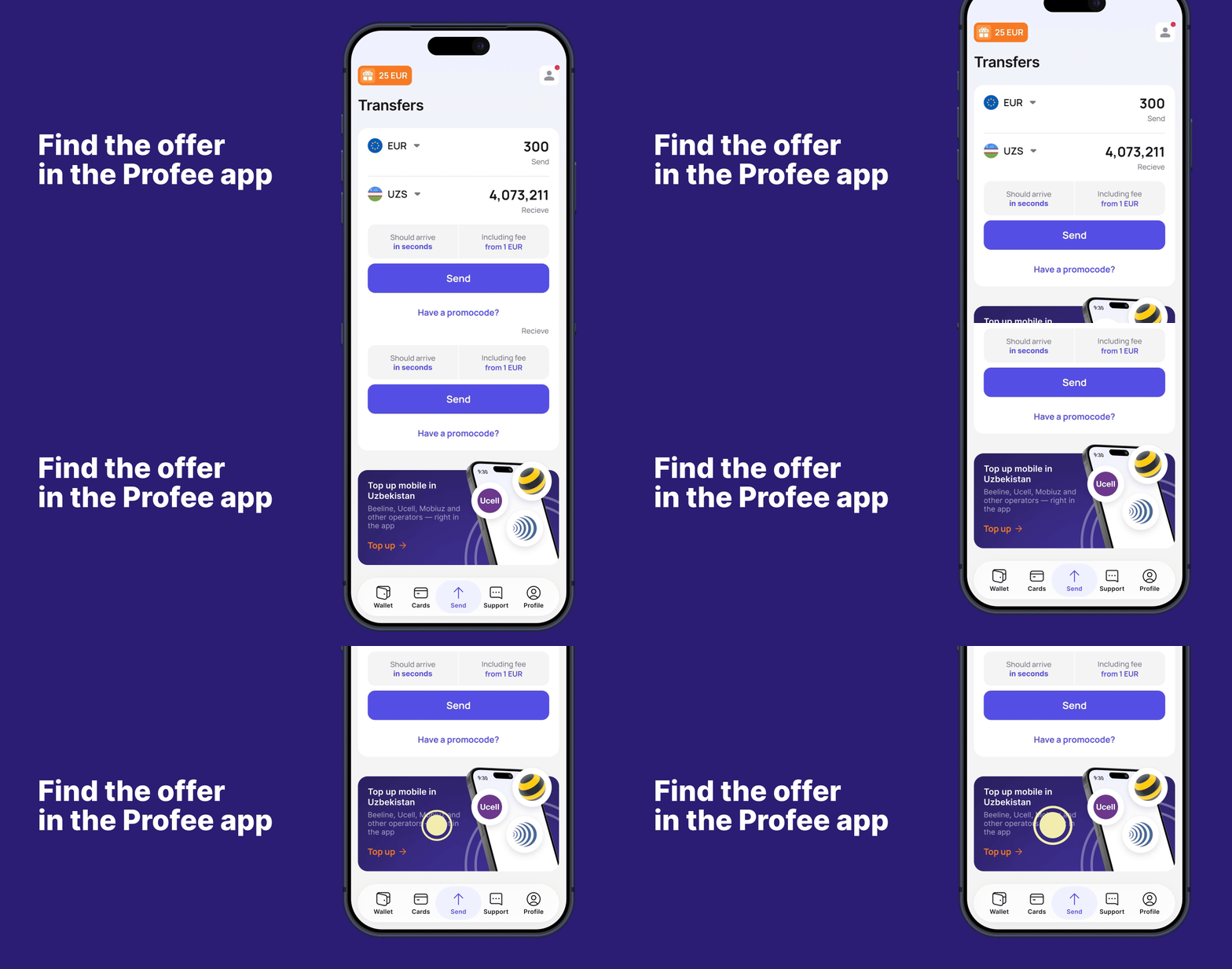
Step 1: Find the offer in the Profee app
First, make sure your app is up to date – you'll need at least version 4.132 on Android or 3.163 on iOS. Then open the app, select Uzbekistan as the destination country, and tap the 'Top up a phone in Uzbekistan' banner. You'll land on the operator selection screen.
Topping up requires identity verification. If you haven't done it yet, we'll ask for an identity document before you proceed – it takes just a couple of minutes. Already verified? Go straight to the next step.
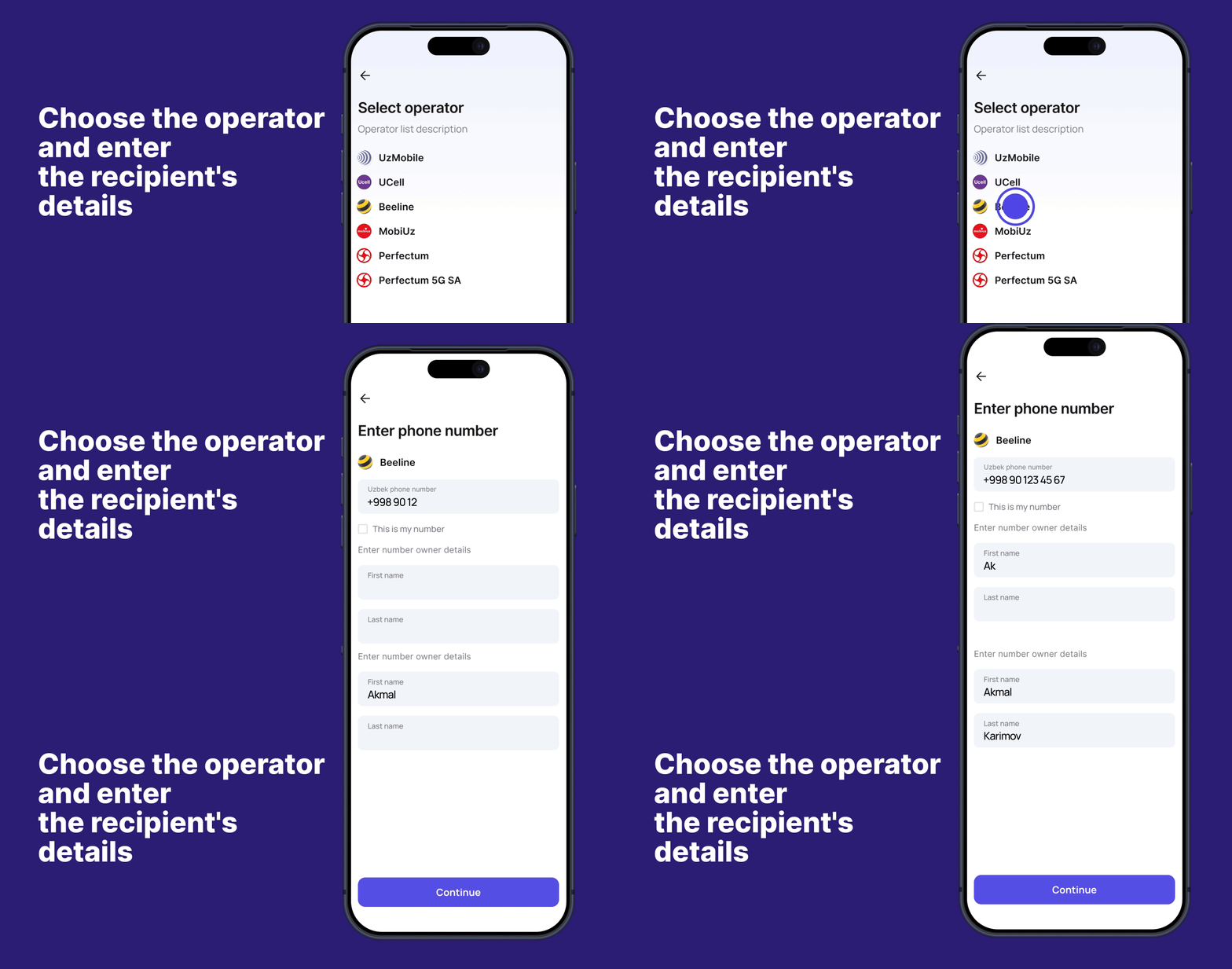
Step 2: Choose the operator and enter the recipient's details
You'll see a list of available operators (Beeline, UCell, MobiUz, UzMobile, Perfectum, Perfectum 5G SA) – select the one you need. Enter the phone number and tell us who it belongs to:
Tap 'This is my number' if it's registered in your name.
Enter the recipient's first and last name if the number belongs to someone else.
Take your time and check that you've filled in the phone number and account holder's name correctly.
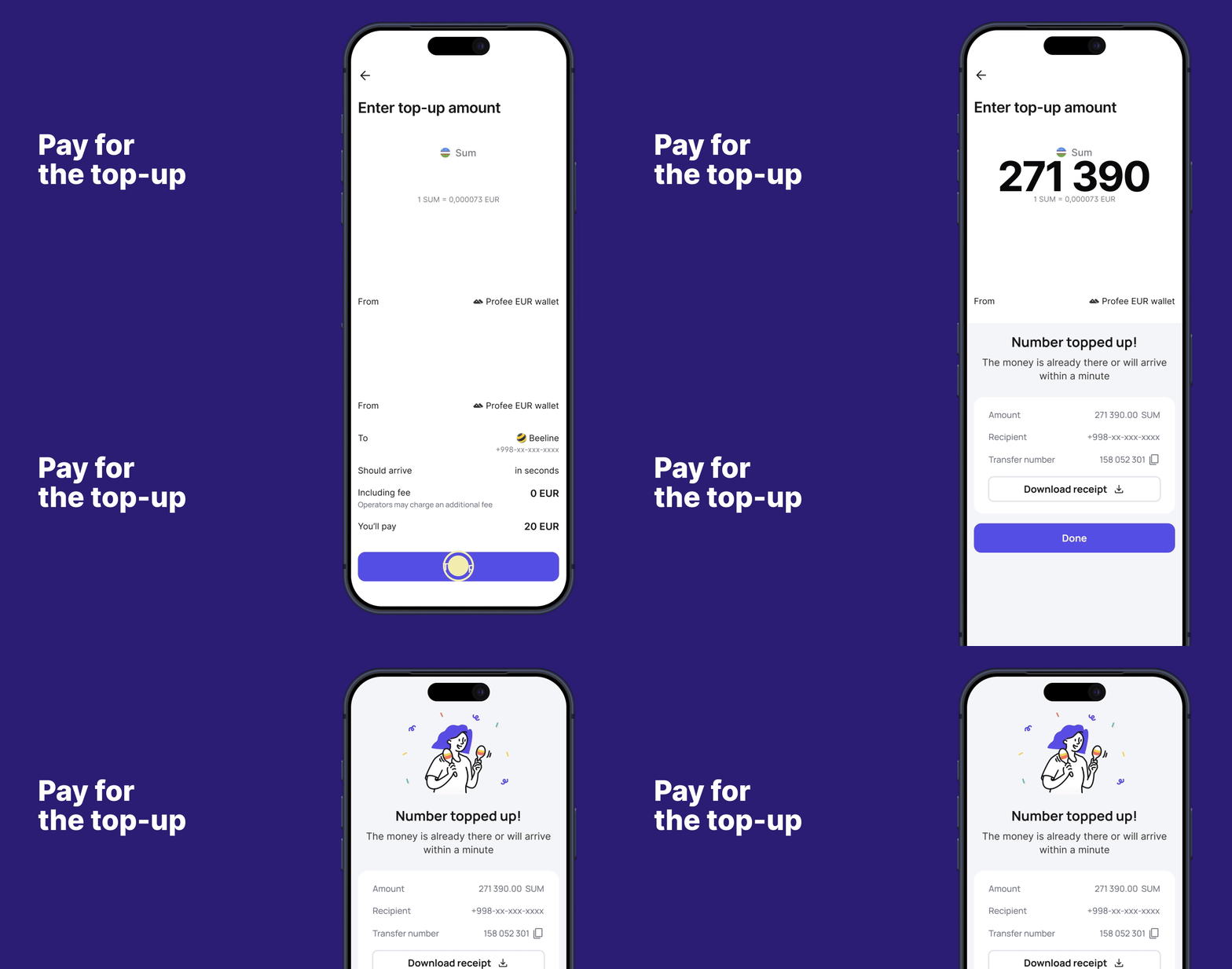
Step 3: Pay for the top-up
You pay from your Profee wallet. If you already have money on it, enter the amount and confirm the payment. If you don't have enough funds, you can quickly transfer money to your wallet from a card, Apple Pay, Google Pay, or any other available method. Once we send the funds, you'll see a confirmation in the app. Money usually arrives within 1–5 minutes.
You can use the service at any time – it's already available in the Profee app.
FAQ: topping up a phone in Uzbekistan
Is there a fee for topping up a phone in Uzbekistan with Profee?
No, we don't charge a fee for top-ups.
Whose phone numbers can I top up?
You can top up your own phone or help friends and family in Uzbekistan. Just make sure you enter the number and the account holder's name correctly.
If I'm topping up someone else's phone, does the recipient need to register with Profee?
No, they don't need to create a Profee profile.
Which operators are available for phone top-ups in Uzbekistan?
Beeline, UCell, MobiUz, UzMobile, Perfectum, Perfectum 5G SA.
Which currencies can I pay in?
In the currency of your Profe wallet – for example, EUR, PLN, or other local currencies.