Canva Pro price in Germany: plans and costs

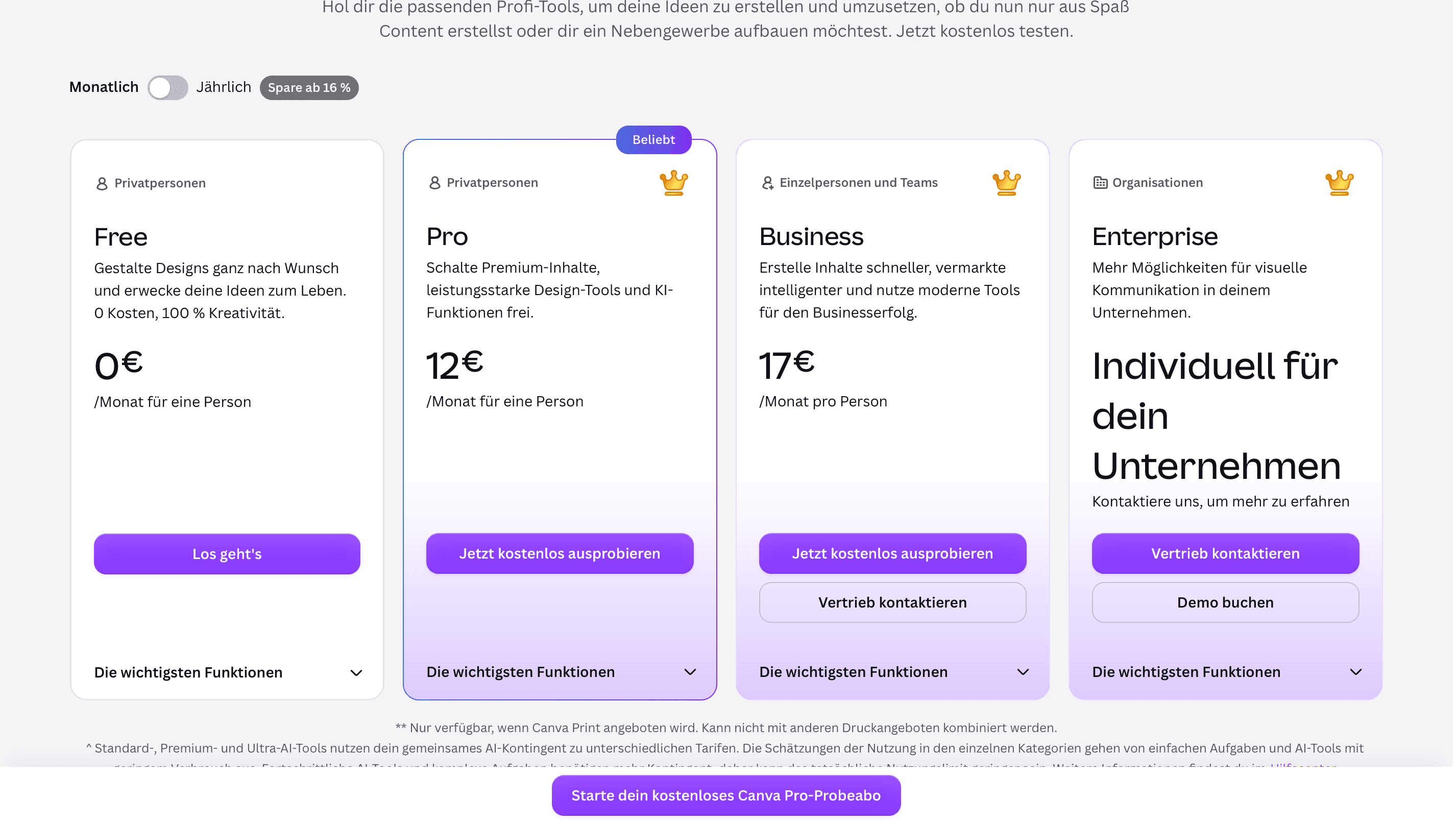
The Canva Pro price in Germany is 12 EUR per month or 110 EUR per year in 2026, while a basic account is free. For teams, Canva Business costs 17 EUR per person per month or 170 EUR per person per year. In this article, we compare the plans and prices to help you choose the one that fits you best.
Canva prices in Germany
Canva Free: enough for simple designs
Canva Pro: for regular users
Canva Business: for people working as a team
Canva Enterprise: for larger companies
Canva Free, Pro and Business compared
How to change or cancel Canva Pro
FAQ: Canva prices in Germany
Canva prices in Germany
You can use Canva for free or choose a paid version starting at 12 EUR per month.
| Plan | Monthly fee | Annual fee | Good for |
|---|---|---|---|
| Canva Free | 0 EUR | 0 EUR | Simple designs now and then |
| Canva Pro | 12 EUR | 110 EUR | One regular user |
| Canva Business | 17 EUR per person | 170 EUR per person | Teams and small businesses |
| Canva Enterprise | Custom | Custom | Larger companies |
These prices are current for Germany as of September 2026 and may change. Check the latest rates on the official Canva pricing page.
If you plan to use Canva Pro for a full year, it’s cheaper to pay annually. If you pay 12 EUR every month, you’ll spend 144 EUR over the year. The annual plan costs 110 EUR, so you save 34 EUR. The same with Business: 204 EUR per person if you pay monthly for a full year, or 170 EUR if you pay annually.
Besides subscriptions like Canva, you may also have regular money transfers back home. With Profee, you can send money from Germany to your family, friends or yourself in more than 90 destinations. Over 95% of our transfers arrive within minutes, depending on the destination and payment method. Check the current rate on the Profee currency converter or in the Profee app.
Canva Free: enough for simple designs
Canva Free gives you the main editor without a monthly fee. You can use it for presentations, CVs, social media posts, invitations and other everyday designs. As a graphic design tool, this plan covers the basics without any cost.
You also get more than 1.6 million templates, over 4.7 million photos, videos, graphics and audio files, 5 GB of cloud storage and limited access to Canva's AI tools (as of 2026).
“Our mission is to empower the world to design – empowering everyone to design anything with every ingredient in every language on every device." – Melanie Perkins, Co-Founder and CEO, Canva. July 2024.
Free makes sense if: you open Canva from time to time and mostly use free templates and elements.
The reason to choose Pro: you keep needing locked content, want to try tools like background removal or resizing, or use Canva often enough that the free limits get in your way.
Canva Pro: for regular users
You get much more content than on the free plan: more than 3.6 million templates, over 141 million premium photos, videos, graphics and audio files, and 100 GB of cloud storage (as of 2026). Pro also gives you background removal, Magic Resize, design translation, more access to Canva AI, up to five Brand Kits and social media scheduling.
If you use Canva for work, these tools can save you quite a bit of manual work. You can resize one design for several platforms, remove a background without opening another app and keep your colours, logos and fonts in one place.
Canva Pro price in Germany is 12 EUR per month or 110 EUR per year.
Pro makes sense if: you use Canva as a graphic design tool regularly for work, freelance projects, social media or your own business.
The reason to stay on Free: you rarely need paid elements or tools, and the free version already covers what you make.
Canva Business: for people working as a team
Business includes 500 GB of cloud storage, up to 100 Brand Kits, approval tools and more control over shared brand content (as of 2026). You get the Pro tools, plus more features for working with other people.
You also get a larger allowance for Canva's premium AI tools. Canva currently lists up to 200 premium AI uses a month with Pro and up to 400 with Business.
Canva Business costs 17 EUR per person per month or 170 EUR per person per year. Since Canva charges per person, your total depends on your team size. For example:
3 people: 510 EUR per year
5 people: 850 EUR per year
Business makes sense if: you and your colleagues work on the same brand, share templates and assets, or need someone to review designs.
"Large teams are benefiting from shared libraries, brand templates, and streamlined collaboration, bridging the gap between creative departments and the rest of the organisation." – Cameron Adams, Co-Founder and Chief Product Officer, Canva. February 2025.
The reason to keep Pro: you work alone and don't need team tools.
Canva Enterprise: for larger companies
Canva doesn't publish a fixed price for Enterprise – you need to contact its sales team for a quote.
The subscription plan includes tools for larger companies, such as SSO, SCIM, custom integrations, more user controls, support for several teams and up to 1,000 Brand Kits. You also get 1 TB of cloud storage.
If you're a freelancer, solo user or small team, you don't need Enterprise.
Canva Free, Pro and Business compared
Free covers the basics, Pro gives you more content and editing tools, while Business adds features for teams and higher limits.
| Feature | Canva Free | Canva Pro | Canva Business |
|---|---|---|---|
| Monthly fee | 0 EUR | 12 EUR | 17 EUR per person |
| Annual fee | 0 EUR | 110 EUR | 170 EUR per person |
| Templates | 1.6M+ | 3.6M+ including premium | 3.6M+ including premium |
| Photos, videos, graphics and audio | 4.7M+ | 141M+ premium assets | 141M+ premium assets |
| Cloud storage | 5 GB | 100 GB | 500 GB |
| Brand Kits | 1, with up to 3 colours | Up to 5 | Up to 100 |
| Background removal | Limited / not included as a full Pro tool | Yes | Yes |
| Resize and translate tools | Limited | Yes | Yes |
| Social media scheduling | No | Yes | Yes |
| Premium AI use | Up to 20 uses | Up to 200 uses | Up to 400 uses |
| Team approvals | No | No | Yes |
| Team admin tools | No | No | Yes |
Features, limits and AI usage allowances are current as of September 2026 and may change. Check the official Canva pricing page for the latest details.
More tips:
How to change or cancel Canva Pro
You can manage your subscription from your Canva account.
Open Canva and go to your account settings.
Open Billing.
Check your current subscription plan.
Change or cancel it.
Your subscription keeps renewing until you cancel it. If you switch from Pro to Business and later cancel Business, Canva won't move you back to Pro. You would need to subscribe to Pro again.
If you bought Canva through the App Store or Google Play, you may need to manage the subscription through Apple or Google instead.
FAQ: Canva prices in Germany
How to access Canva teams?
You can no longer sign up for Canva Teams as a new customer. If you need a paid plan for several people, Canva now offers Business.
How much does Canva Pro cost in Germany?
Canva Pro costs 12 EUR per month or 110 EUR per year in Germany in 2026.
Can I buy Canva Pro Lifetime?
No. You can pay monthly or yearly, and the subscription continues until you cancel it.
Who gets Canva Pro for free in Germany?
Eligible school teachers and students can use Canva Education for free. It’s mainly for primary and secondary education; university students don’t automatically qualify.
Which is better, Adobe Express or Canva?
It depends on what you use it for. Canva is strong for templates, everyday design and team content, while Adobe Express fits better if you already work with Photoshop, Illustrator, Lightroom or other Adobe apps.