iCloud prices in Germany: storage plans compared

iCloud prices in Germany range from 0 EUR to 59.99 EUR per month in 2026. You get 5 GB for free, while paid iCloud+ options start at 0.99 EUR for 50 GB.
For most iPhone owners, 50 GB or 200 GB are enough to cover all photos and backups. The larger plans are for when you keep a lot of videos or several people share the storage.
iCloud prices in Germany
iCloud Free: basic syncing and backups
iCloud+ 50 GB plan: enough for one light user
iCloud+ 200 GB plan: more space for photos and family
iCloud+ 2 TB, 6 TB and 12 TB plans: for large photo and video libraries
iCloud Free, 50 GB, 200 GB and larger plans compared
Sharing iCloud storage with family
How to upgrade or downgrade iCloud storage
FAQ: iCloud in Germany
iCloud prices in Germany
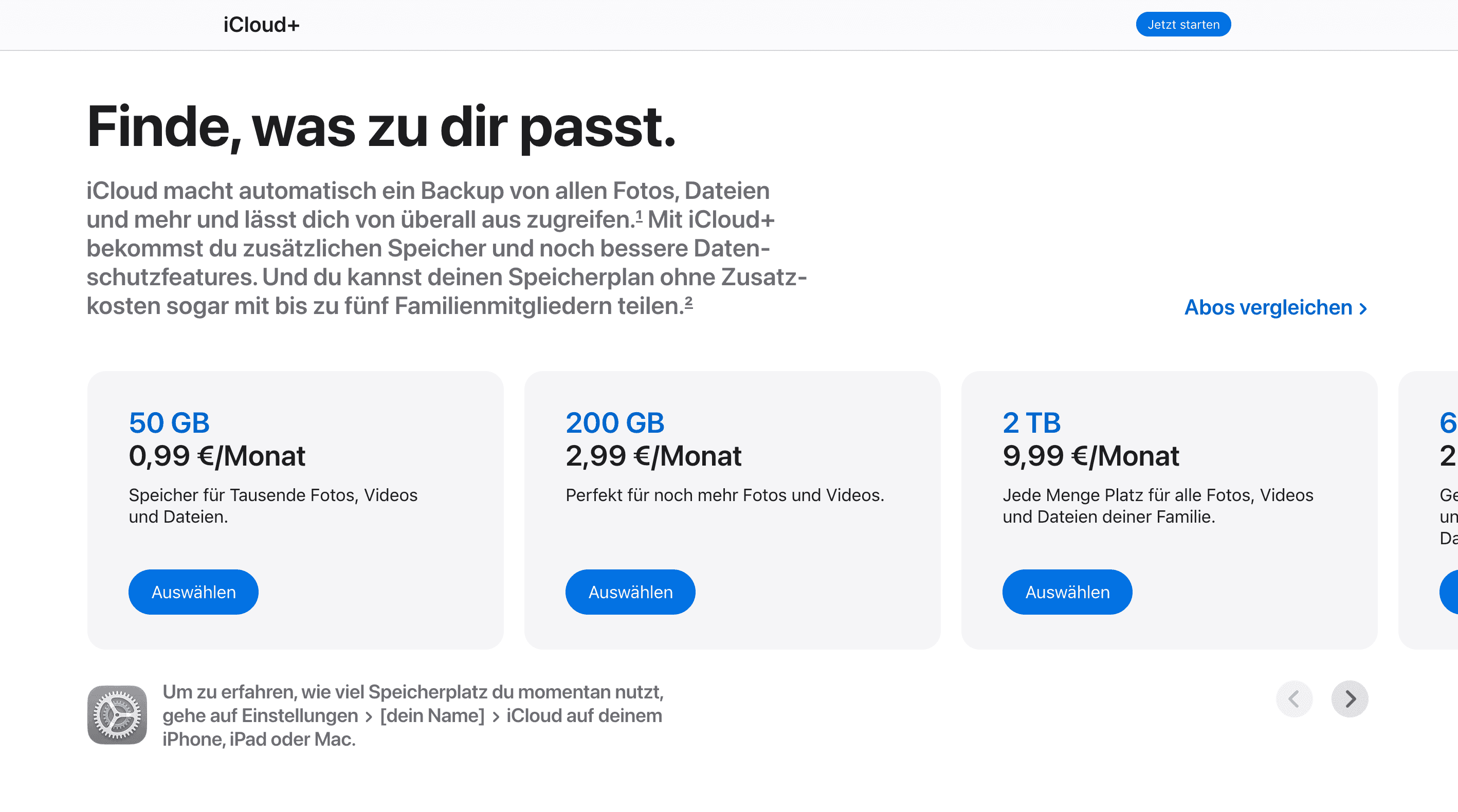
You can use iCloud for 0 EUR or pay for more storage at 0.99–59.99 EUR per month. All paid plans come with a few extras besides storage: iCloud+ Private Relay, Hide My Email, custom email domains and HomeKit Secure Video.
Note that Apple doesn't support annual billing, so paying monthly is the only option left.
| Plan | Storage | Price per month, VAT included | What you’d pay over a year |
|---|---|---|---|
| iCloud Free | 5 GB | 0 EUR | 0 EUR |
| iCloud+ | 50 GB | 0.99 EUR | 11.88 EUR |
| iCloud+ | 200 GB | 2.99 EUR | 35.88 EUR |
| iCloud+ | 2 TB | 9.99 EUR | 119.88 EUR |
| iCloud+ | 6 TB | 29.99 EUR | 359.88 EUR |
| iCloud+ | 12 TB | 59.99 EUR | 719.88 EUR |
The EUR pricing and features are true as of September 2026, but may change. You can check the freshest prices on the official Apple Support page.
If you live in Germany, iCloud may be one of many small subscriptions coming out of your account every month. If you also regularly send money to family back home, Profee lets you make international transfers from Germany to over 90 destinations. We send funds quickly – over 95% of our transfers arrive within minutes, depending on the destination and payment method.
Check the current rate on the Profee currency converter or in the Profee app.
iCloud Free: basic syncing and backups
With a free Apple Account, you get 5 GB for photos, files, messages, app data and iPhone or iPad backups.
Free makes sense if: you use iCloud now and then and don’t keep your full photo library or device backups there.
The reason to upgrade: you keep seeing an iCloud storage warning, your phone can’t complete a backup, or new photos stop syncing.
iCloud+ 50 GB plan: enough for one light user
iCloud+ 50 GB costs 0.99 EUR per month and gives you ten times the free storage.
For one iPhone, 50 GB can cover regular backups, documents and a growing photo library. While the basics fit, 4K videos will fill the storage quickly.
"I shot 2.07 GB of footage – 96 photos, 5 videos – on Easter Sunday alone. Those are the keepers, after culling all the blurry and meh shots." – John Gruber, founder and author of Daring Fireball, April 2024.
50 GB makes sense if: you mainly use one Apple device and want iCloud for backups and everyday photos.
The reason to choose 200 GB: you have several devices, already use most of your 50 GB or want to share storage with someone else.
iCloud+ 200 GB plan: more space for photos and family
iCloud+ 200 GB costs 2.99 EUR per month and is four times larger than the 50 GB plan.
200 GB is already enough to use Family Sharing conveniently. You share storage allowance with up to five family members, while everyone keeps their own Apple Account and their own photos, files and backups. For example, if you use 80 GB and your partner uses 50 GB, you have used 130 GB of the same 200 GB plan.
The 200 GB tier also supports all the HomeKit Secure Video for up to five cameras. If you’re worried about the security, here’s what Craig Federighi, Apple Senior Vice President of Software Engineering, says about HomeKit:
"The video is analysed in your home, on your resident iPad, HomePod or Apple TV, and then it's encrypted and securely sent to iCloud where no one – not even Apple – can see it." – WWDC 2019 keynote.
200 GB makes sense if: you have several Apple devices, take plenty of photos or want one plan for several people.
The reason to move to 2 TB: you’re regularly clearing old photos, videos or backups to stay below 200 GB.
iCloud+ 2 TB, 6 TB and 12 TB plans: for large photo and video libraries
The 2 TB, 6 TB and 12 TB plans are mainly for people with very large media libraries.
2 TB plan
For 9.99 EUR per month, you get 2 TB, or 2,000 GB. Such storage gives a family more room to share one plan and can hold years of photos, videos and backups. It also removes the five-camera limit for HomeKit Secure Video.
2 TB makes sense if: your photo and video library is already measured in hundreds of gigabytes, or several people use the same iCloud storage.
6 TB and 12 TB
Six terabytes costs 29.99 EUR per month, and 12 TB costs 59.99 EUR. At this level, we are talking about very large libraries: years of 4K video, thousands of RAW photos, large work files, or several people sharing the same storage.
The bigger plans don’t really get cheaper per terabyte. Six TB costs about three times as much as 2 TB, and 12 TB costs about twice as much as 6 TB. So, if you don’t need the space, you won’t get any benefits.
iCloud Free, 50 GB, 200 GB and larger plans compared
Free covers basic syncing, 50 GB gives one person room for backups and photos, 200 GB is easier for several devices or family sharing, and 2 TB and above are for much larger libraries.
| Free plan | 50 GB plan | 200 GB plan | 2 TB plan | 6 TB plan | 12 TB plan | |
|---|---|---|---|---|---|---|
| Monthly price, VAT included | 0 EUR | 0.99 EUR | 2.99 EUR | 9.99 EUR | 29.99 EUR | 59.99 EUR |
| Annual cost, VAT included | 0 EUR | 11.88 EUR | 35.88 EUR | 119.88 EUR | 359.88 EUR | 719.88 EUR |
| iCloud backups | Yes | Yes | Yes | Yes | Yes | Yes |
| iCloud Photos | Yes | Yes | Yes | Yes | Yes | Yes |
| Family Sharing | – | Up to 5 others | Up to 5 others | Up to 5 others | Up to 5 others | Up to 5 others |
| Private Relay | No | Yes | Yes | Yes | Yes | Yes |
| Hide My Email | No | Yes | Yes | Yes | Yes | Yes |
| HomeKit Secure Video | No | 1 camera | Up to 5 cameras | Unlimited | Unlimited | Unlimited |
| Best for | Basic syncing | One user | Several devices / family | Large libraries | Several TB of data | Several TB of data |
The EUR pricing and features are true as of September 2026, but may change. You can check the freshest prices on the official Apple Support page.
Sharing iCloud storage with family
Any paid iCloud+ plan can be shared with up to five other people through Family Sharing. You share the storage, not the contents of your account. Your partner can’t see your photo library, files or backups just because you use the same 200 GB or 2 TB plan.
For example, a family sharing 200 GB might use it like this:
100 GB for one person;
60 GB for another;
40 GB for a third.
If several people are already paying separately for iCloud+, check how much storage you use together. One shared plan may cover everyone.
How to upgrade or downgrade iCloud storage
You can change your iCloud storage plan from your iPhone or iPad settings.
Open Settings.
Tap your name.
Open iCloud.
Choose the storage or iCloud+ option.
Select a larger or smaller plan.
Confirm the change.
If you upgrade, Apple starts charging the new monthly price. If you downgrade, the smaller plan takes effect after your current billing period ends.
Before downgrading, check how much storage you use. If your data takes up more space than the new plan allows, new photos, files and backups may stop syncing until you free up space or upgrade again.
You can also change your iCloud+ plan on a Mac or through iCloud for Windows.
More tips:
- ChatGPT price in Germany: Free, Go, Plus and Pro plans.
- LinkedIn Premium price in Germany: plans and whether it is worth it.
- Cost of living in Germany in 2026: Full breakdown.
FAQ: iCloud in Germany
Do I need both Apple One and iCloud+?
Not necessarily. Apple One already includes 50 GB, 200 GB or 2 TB of iCloud+, depending on the plan.
Can I buy iCloud for 1 year?
No. Apple bills iCloud+ monthly and doesn’t offer a separate annual plan.
What happens if my iCloud is full?
Your existing data stays there, but new photos, files and backups can stop syncing until you delete something or buy more storage.
Is there a 1TB iCloud plan?
No. Apple goes from 200 GB straight to 2 TB. The other larger plans are 6 TB and 12 TB.
Can I still take photos if my iCloud storage is full?
Yes. You can still take photos, but new photos may not upload to iCloud until you free up space or upgrade your plan.